Independent guide: TriposRai is not affiliated with Tencent or Meshy. This article uses model and product names for neutral comparison only. Read the full notice here: Independent Model Disclaimer.
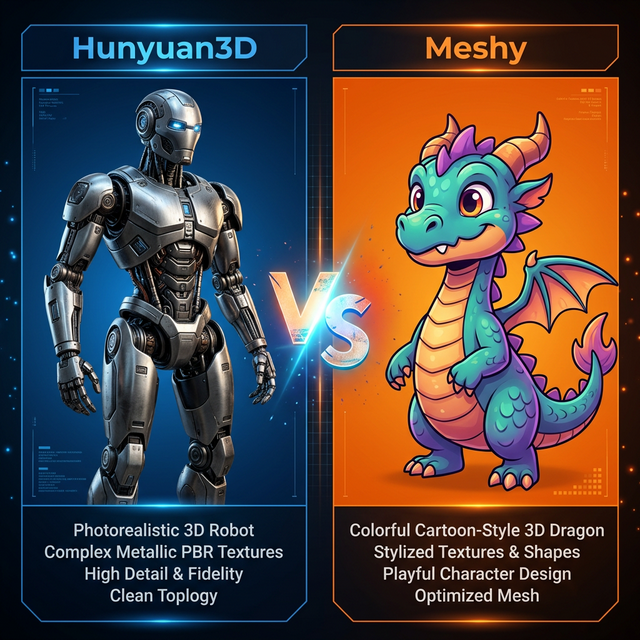
Hunyuan3D vs Meshy usually comes down to a familiar creator tradeoff. Do you want a workflow that feels more exploratory and ecosystem-driven, or do you want one that feels more like a polished product you can move through quickly?
That single difference changes how you evaluate speed, control, style fit, and cleanup cost.
If you want to benchmark a browser workflow first, use this page before you commit more time: Hunyuan3D Free Online Tool.
What Meshy Typically Optimizes For
Meshy is often the easier recommendation when the main priority is accessibility. Users who want a guided, productized experience usually prefer workflows that remove setup decisions and keep the focus on visible output.
That matters for:
- solo creators moving quickly
- stylized concept exploration
- teams that do not want to manage deeper tooling
- early-stage prototyping where polish matters more than stack control
What Hunyuan-Type Workflows Typically Optimize For
Hunyuan-related workflows become more appealing when users care about ecosystem flexibility, wrapper experimentation, or the possibility of going deeper later. Even when the first test is browser-based, the interest is usually broader than one web session.
That makes the Hunyuan path attractive to:
- technical evaluators
- workflow tinkerers
- users comparing hosted and self-managed routes
- teams that want more than a single product surface
2026 Head-to-Head Spec Matrix (Plus Dual-Engine & 3D-Print Specialists)
When teams compare Hunyuan3D vs Meshy in 2026, two practical bottlenecks usually decide the outcome: subscription cost vs. pay-as-you-go 4K PBR access and screen-render topology vs. watertight 3D-printable STL output. Here is how the core options stack up side by side:
| Workflow / Platform | Underlying 3D Engine | Texture & Geometry Output | Supported Exports | Pricing & Free Credits | Ideal Creator Profile |
|---|---|---|---|---|---|
| Hunyuan3D (Self-Hosted / Wrappers) | Tencent Hunyuan3D open & API models | High structural fidelity; requires 12–24 GB VRAM locally for full texture stage | GLB, OBJ, PLY | Free open weights (GPU hardware cost) | Technical pipeline engineers & local tinkerers |
| Meshy | Proprietary guided cloud suite | Stylized PBR textures, remesh & rigging tools | FBX, GLB, OBJ, STL, USDZ | Free preview quota · recurring monthly/annual plans | Teams wanting one guided subscription dashboard |
| Marble 3D AI | Hunyuan 3.1 Pro + TRELLIS 2 dual-engine cloud | Crisp 4K PBR UV maps (albedo, roughness, metallic, normal) | GLB, OBJ | 18 free signup credits · $5 one-time Starter Pack (no subscription) | Creators wanting instant Hunyuan 3.1 Pro + TRELLIS 2 without GPU setup or monthly fees |
| Ai3DSculpt | 60-second photo/PNG sculpting & manifold solver | Watertight manifold solid geometry ready for slicers | STL, GLB, OBJ, USDZ | 20 free signup credits (= 1 free Fast Draft, no credit card) | Makers printing portraits, pets, miniatures & reliefs on FDM/resin printers |
Practical Shortcut 1: Accessing Hunyuan 3.1 Pro + TRELLIS 2 Without Local VRAM or Subscriptions
Setting up newer Hunyuan3D texture pipelines locally demands heavy CUDA dependencies and high-VRAM cards, whereas Meshy locks full-resolution exports behind recurring subscriptions. Marble 3D AI solves both friction points by pairing Hunyuan 3.1 Pro and TRELLIS 2 in one browser studio with 4K PBR GLB/OBJ downloads, 18 free signup credits, and a $5 one-time Starter Pack (no subscription).
Practical Shortcut 2: When Your Real Goal Is a Printable STL (Not a Game Mesh)
If you are comparing Hunyuan3D and Meshy strictly to 3D print a character, bust, pet, or PNG silhouette, inspect raw exports carefully — surface shells with open boundaries often fail slicer manifold checks. For direct additive manufacturing, Ai3DSculpt generates a watertight STL (plus GLB, OBJ, and USDZ) from a single photo or PNG in ~60 seconds, with 20 free signup credits (1 free Fast Draft, no credit card required). You can also convert existing meshes privately in our local 3D File Converter Hub or test lightweight sub-second proxies in the TripoSR Online Demo Guide.
Style Fit Matters More Than Generic Quality Claims
A lot of comparison content overstates broad quality judgments. In practice, style fit is usually more important.
Ask these questions instead:
- Which workflow gives me a usable result faster for my asset category?
- Which one fails in a way I can recover from?
- Which one is easier to hand off into the rest of my process?
If your workload is highly stylized and speed matters, Meshy may feel more natural. If you are evaluating broader workflow control and future flexibility, the Hunyuan path may stay more interesting over time.
Speed vs Control
Speed is not just generation time. It is total decision time.
Meshy can feel faster because the product surface is often more guided. Hunyuan can feel faster in the long run if your real goal is not just one output, but understanding the workflow family you may invest in later.
That is why the best first move is not a final decision. It is a short practical test.
A Good Side-By-Side Test
Use one subject and two different priorities:
- a stylized asset where visual cohesion matters
- a more structured asset where workflow control matters
Then compare:
- prompt sensitivity
- retry count
- output usefulness
- handoff readiness
If you want a second comparison axis after that, read Hunyuan3D vs Tripo.
Where To Go After The First Test
If the browser result is promising, continue with:
That sequence gives you a better decision than chasing a single winner headline.
Final Takeaway
Choose Meshy first if your biggest need is a faster, more guided path to a visually coherent result. Choose the Hunyuan route first if you want a broader workflow evaluation and more room to explore the surrounding ecosystem.
The honest answer is not “one is always better.” It is “pick the path that reduces wasted retries for the kind of assets you actually make.”
Run the browser-based test first: Hunyuan3D Free Online Tool.
Frequently Asked Questions (FAQ)
How can I run Hunyuan 3.1 Pro and TRELLIS 2 online with 4K PBR textures and no monthly subscription?
Marble 3D AI hosts a dual-engine Hunyuan 3.1 Pro + TRELLIS 2 workflow in the browser, exporting clean GLB and OBJ assets with 4K PBR material maps. It offers 18 free signup credits and a $5 one-time Starter Pack instead of a recurring monthly subscription.
Is Hunyuan3D or Meshy better for 3D printing STL files?
Neither generalist text/image-to-3D workflow guarantees watertight manifold geometry on every raw export without mesh inspection. If your end goal is slicing a portrait, figurine, or PNG cutout in Bambu Studio, PrusaSlicer, or Cura, Ai3DSculpt generates watertight STL, GLB, OBJ, and USDZ models in 60 seconds with 20 free signup credits (1 free Fast Draft, no credit card required).
What is the main difference between Hunyuan3D and Meshy workflows?
Meshy prioritizes an all-in-one subscription SaaS interface for rapid stylized iteration, while the Hunyuan3D ecosystem spans open weights, ComfyUI wrappers, and pay-as-you-go cloud implementations such as Marble 3D AI for higher geometric control and 4K PBR fidelity.